Hypseus Singe Setup
Hypseus Singe runs laserdisc arcade games such as Dragon's Lair and Space Ace, plus Singe games such as the American Laser Games titles.
Each game needs three things in the right place:
| File | Example | Location |
|---|---|---|
| Game folder | lair.daphne | Your laserdisc library folder |
| Framefile | lair.txt | Inside the game folder |
| Video and audio | lair.m2v, lair.ogg | Inside the game folder, or the folder named on the framefile's first line |
| ROM zip, Daphne games only | lair.zip | The roms folder inside the Hypseus Singe folder |
HyperHQ launches the game folder. HyperHQ finds the framefile inside, then passes the framefile to Hypseus Singe.
Install Hypseus Singe
Download the Windows release from the Hypseus Singe releases page. Extract the files to their own folder, for example C:/Emulators/Hypseus Singe/.
Name the files
Names drive the whole launch. Hypseus Singe uses the game folder name to pick the game driver.
- The game folder name is the Hypseus game name, plus
.daphnefor laserdisc games or.singefor Singe games. - The framefile name matches the game folder name.
lair.daphneneedslair.txt. A file namedframefile.txtdoes not match. - The ROM zip name matches the game name.
lair.daphneneedsroms/lair.zip. - Singe games use a script named after the folder.
timegal.singeneedstimegal.singeinside.
Common Hypseus game names:
| Game | Folder name |
|---|---|
| Dragon's Lair | lair.daphne |
| Dragon's Lair II: Time Warp | lair2.daphne |
| Dragon's Lair Enhancement 2.1 | dle21.daphne |
| Space Ace | ace.daphne |
| Space Ace Enhancement | sae.daphne |
| Cliff Hanger | cliff.daphne |
| Thayer's Quest | tq.daphne |
The Hypseus Singe command line reference lists every game name.
Lay out the library
Keep game folders together in one library folder:
D:/Laserdisc/
  lair.daphne/
    lair.txt
    lair.m2v
    lair.ogg
  ace.daphne/
    ace.txt
    ace.m2v
    ace.ogg
  timegal.singe/
    timegal.txt
    timegal.singe
    timegal.m2v
    timegal.ogg
Keep ROM zips in the Hypseus Singe folder:
C:/Emulators/Hypseus Singe/
  hypseus.exe
  roms/
    lair.zip
    ace.zip
Singe games run from their script. Singe games need no ROM zip.
Check the framefile
Open the framefile in a text editor. The first line names the folder holding the video files. A relative path starts from the framefile's own folder.
- Video files beside the framefile: set the first line to
. - Video files in a different folder: set the first line to the full path, for example
D:/Laserdisc Video/lair/
Wrong first lines cause most failed launches. Check this line after you move or rename a game folder.
Convert a Hypseus Singe layout
The Hypseus Singe download keeps games in vldp/lair/ and singe/timegal/. HyperHQ imports folders ending in .daphne or .singe, so rename each game folder:
| Hypseus Singe layout | HyperHQ layout |
|---|---|
vldp/lair/lair.txt | lair.daphne/lair.txt |
singe/timegal/timegal.txt | timegal.singe/timegal.txt |
Move the renamed folders into your library folder. Leave the ROM zips in roms.
Test outside HyperHQ
Confirm one game runs in Hypseus Singe before you add the system.
- Open a Command Prompt in the Hypseus Singe folder.
- Run the game with the full path to the framefile:
hypseus.exe lair vldp -framefile "D:\Laserdisc\lair.daphne\lair.txt" -fullscreen
For a Singe game, use singe as the game name and add the script:
hypseus.exe singe vldp -framefile "D:\Laserdisc\timegal.singe\timegal.txt" -script "D:\Laserdisc\timegal.singe\timegal.singe" -fullscreen
A failed test points to the files, not to HyperHQ. Fix the framefile, video files, or ROM zip, then test again.
Add the system
- Start the Add System wizard.
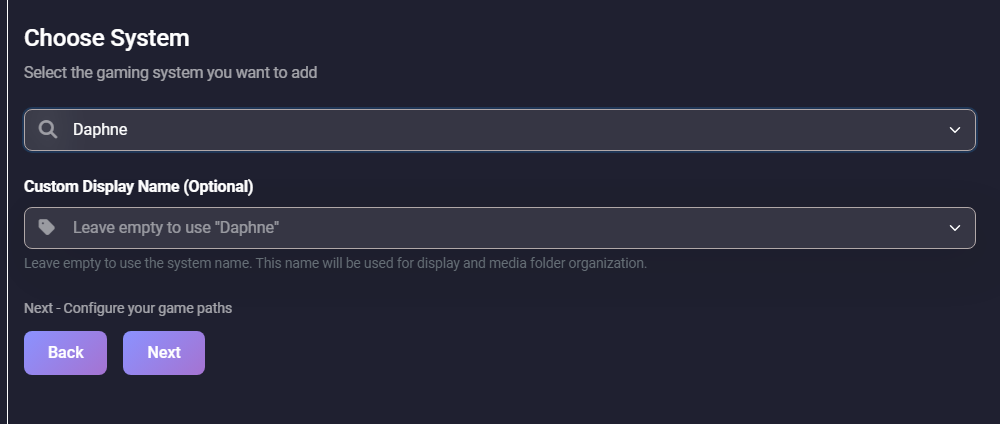
- Choose Daphne for laserdisc games. Choose American Laser Games for Singe games. Use one system per type so media matches.
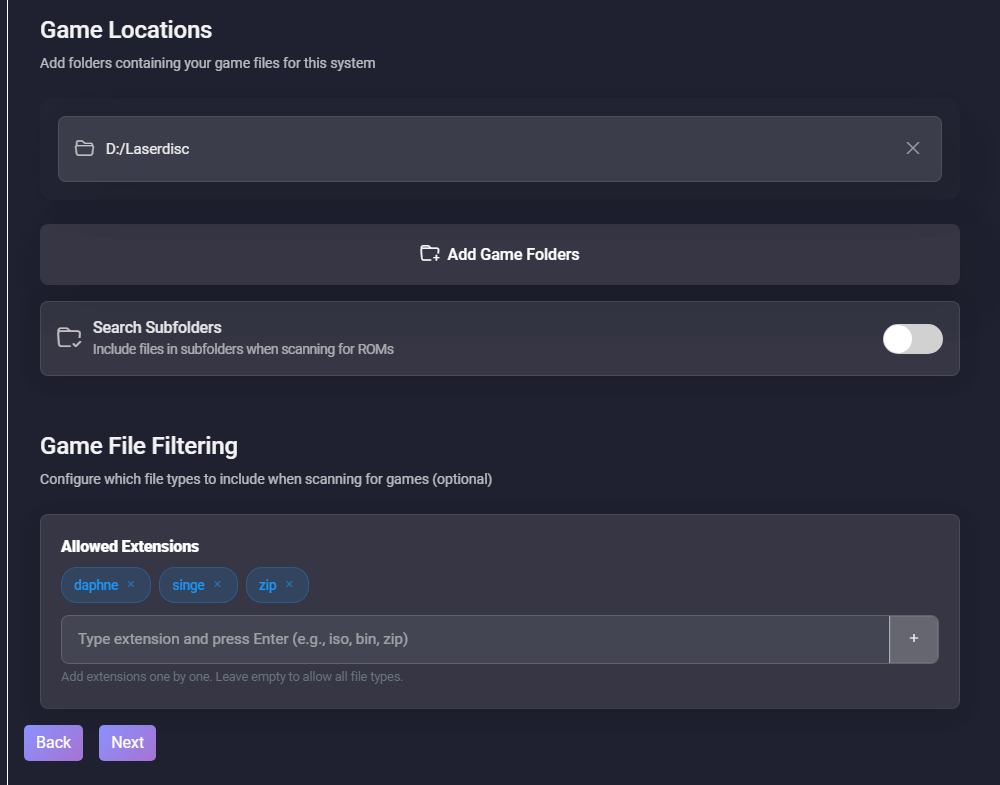
- On Game Locations, select Add Game Folders and pick your library folder, for example
D:/Laserdisc/. Do not select theromsfolder. - Under Allowed Extensions, keep
daphne,singe, andzip. Removeisoand other extensions.
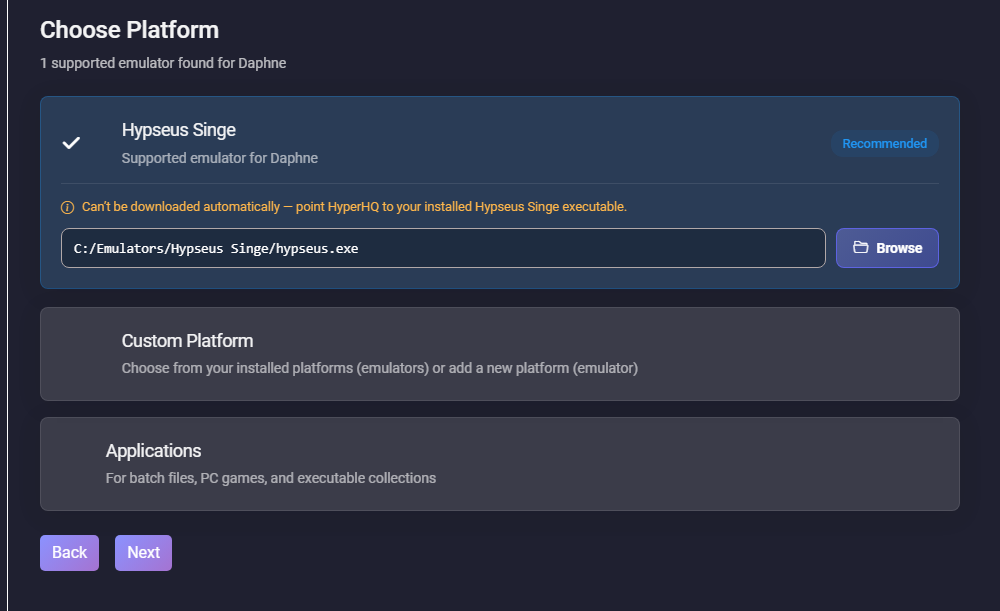
- On Choose Platform, select Hypseus Singe. HyperHQ does not download Hypseus Singe, so select Browse and pick the
hypseus.exefrom your test.
- Finish the wizard and wait for the import to finish.
- Launch one game.
Each game folder shows up as one game. Change display names in HyperHQ. Leave the folder names unchanged.
Optional extras
Per-game options
Add a .commands file to pass extra Hypseus Singe options for one game. Name the file after the game folder and save the file inside the game folder:
lair.daphne/
  lair.txt
  lair.commands
Put the options on one line, for example:
-scorebezel
HyperHQ adds these options to the launch. HyperHQ skips a game name, vldp, -framefile, -homedir, -datadir, or -fullscreen repeated in the file, since the launch already sets these.
Zipped Singe games
Some Singe games ship as a zip of Lua scripts instead of a .singe script. HyperHQ does not detect the zip. Add a .commands file inside the game folder:
-zlua timegal.zip
HyperHQ looks for the zip inside the game folder.
Bezels
Save a PNG in the bezels folder inside the Hypseus Singe folder. HyperHQ applies bezels/lair.png to lair. A bezels/default.png covers games without their own bezel. Bezel names accept letters, numbers, hyphens, and underscores only.
Troubleshooting
- Error naming a missing framefile, such as lair.txt: Rename the framefile to match the game folder.
lair.daphneneedslair.txt. - No games after import: Check the folder names end in
.daphneor.singe. Open the system's extension filters and confirmdaphneandsingeare listed. Then select Refresh Games. - ROM zips such as lair.zip show up as games: The ROM path points at the Hypseus Singe folder or the
romsfolder. Point the system at the library folder. - Black screen, or Hypseus Singe closes at once: Check the framefile's first line, the video file names inside the framefile, and the ROM zip in
roms. Run the command line test above to see the Hypseus Singe error. - Wrong game driver: The folder name sets the driver. Rename
Dragons Lair.daphnetolair.daphne, and rename the framefile tolair.txt. - Runs from the Command Prompt, fails from HyperHQ: Check the platform path points to
hypseus.exe, then review Settings, HyperHQ, Logs. Lines starting with[Hypseus]show the per-game options and bezel HyperHQ applied.